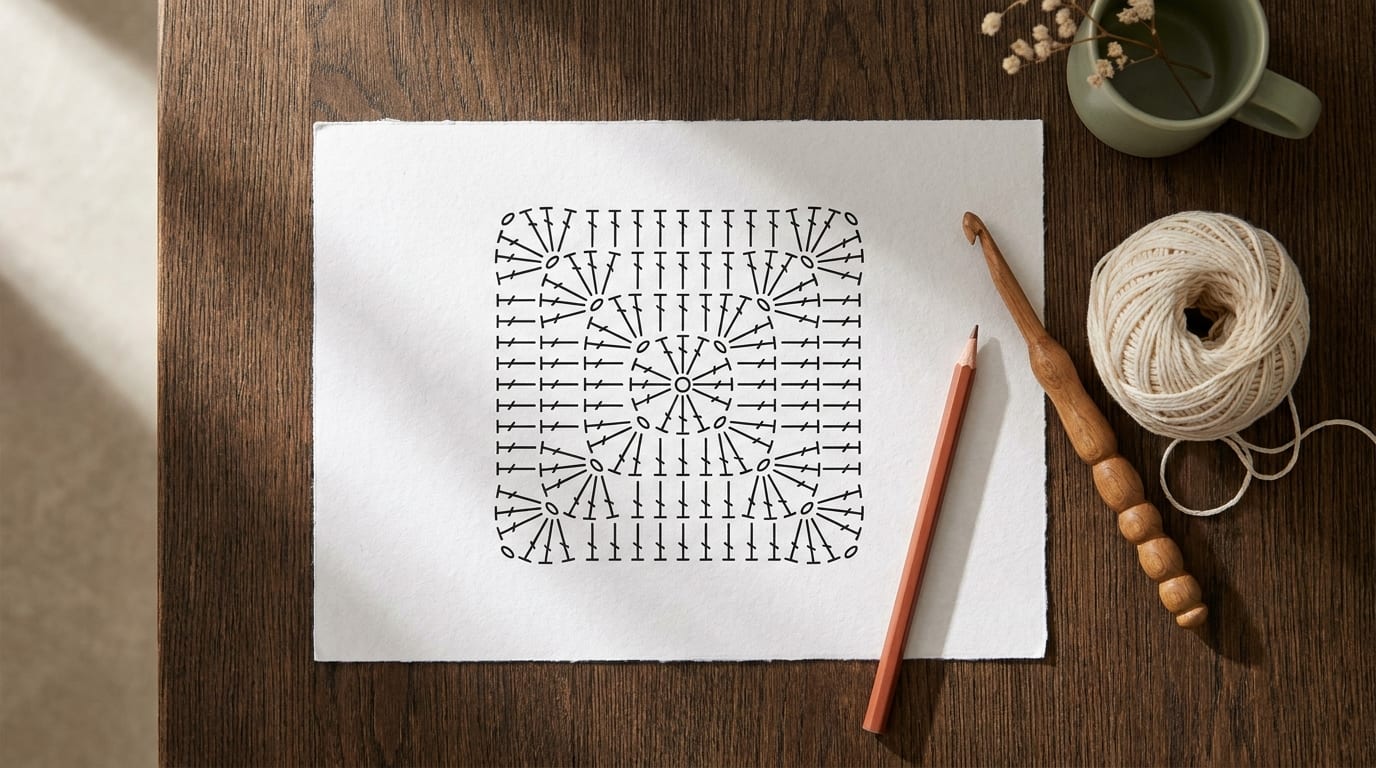
What a crochet chart is and why it helps
A crochet chart is a symbol diagram that maps out a pattern visually, one stitch per symbol, arranged in the same shape as the finished fabric. Instead of reading "sc, dc, ch 2, dc, sc" across a line of text, you look at a small grid and follow the symbols the same way you would read a simple map.
Written patterns are clear and precise, but they ask you to hold a lot of information in your head at once. A chart lets you see the whole shape of a section, where motifs repeat, where increases happen, and how pieces fit together, at a single glance. That spatial overview is hard to get from words alone.
Charts are especially helpful in two situations. The first is when you are a visual learner who finds it easier to follow a picture than a sentence. The second is when you are working from a pattern originally written in another language, because the internationally standardized crochet symbols mean the same thing in Japanese, German, and English editions of the same chart.
What the standard crochet symbols mean
Before you can read a chart, you need to know the core symbols. The good news is that the most important ones are easy to remember because they are shaped to suggest the stitch.
Chain stitch (ch): An oval or a small elongated dash. Chains form the foundation row and are used as turning chains and space-makers in lace work.
Slip stitch (sl st): A small filled dot or a very short horizontal dash. Slip stitches join rounds and move the yarn across stitches without adding height.
Single crochet (sc): An X or a plus sign (+). The X shape visually suggests the two loops the hook passes through. Single crochet is the shortest working stitch, so its symbol sits low on the grid.
Half double crochet (hdc): A T-shape with a short horizontal bar, taller than the sc symbol. The extra height reflects the yarn-over that distinguishes this stitch from a single crochet.
Double crochet (dc): A T-shape with a taller stem and one diagonal crossbar across the stem. The crossbar represents the extra yarn-over. Double crochet is the most common stitch in European and American patterns.
Treble crochet (tr): Same T-shape, taller still, with two diagonal crossbars. Each additional crossbar adds one more yarn-over to the stitch.
Most charts include a printed legend. When you encounter a symbol you don't recognize, the legend is your first stop. If you want a searchable reference for every stitch shown in charts, our crochet stitches library covers each one with written descriptions and tips.
Four free crochet chart maker tools
1. CrochetZen stitch chart maker
The CrochetZen stitch chart maker is built into the same app and website used for AI pattern generation. You draw on a grid, choose stitches from the symbol panel, and see the chart build as you work. Because it lives in the same tool as your pattern, you can generate a pattern and immediately map it into a chart without switching between apps or tabs.
The chart maker is free to use at the link above. It is a good first choice if you are already using CrochetZen for pattern planning or if you want a clean, minimal interface without a long learning curve.
2. Stitch Fiddle
Stitch Fiddle is the most widely used browser-based chart editor in the crochet community. The free tier gives you a grid editor, a standard stitch symbol library, and the ability to export or print your chart. You can set the grid size, assign colors for colorwork, and zoom in and out to check details.
The interface takes a few minutes to learn, mainly because you set the stitch type by clicking on the symbol first, then placing it on the grid. Once that click order becomes second nature, the workflow is smooth. The free account allows saving up to five charts. For a detailed comparison of Stitch Fiddle with other tools, see the Stitch Fiddle alternative guide.
3. Stitchboard.com
Stitchboard is a free browser tool designed originally for cross-stitch but used regularly by filet crochet designers. It works best for grid-based patterns where each square is one stitch or one block of filet mesh, rather than shaped motifs with different stitch heights.
Upload an image and Stitchboard converts it into a symbol grid automatically, which is handy if you are designing a logo, letter, or silhouette motif for a filet crochet panel. The output is a printable chart you can follow row by row. There is no account needed and no cost.
4. Knit Pro (chart view)
Knit Pro is primarily a knitting pattern tool, but its chart view function works for simple crochet charts too. You type in a pattern written in standard abbreviations and Knit Pro generates a basic visual grid from your text. It is less flexible than Stitch Fiddle for custom symbol placement, but useful if you have a written pattern you want to quickly convert to a chart for easier reading.
The core features are free. The app runs in a browser with no download required.
How to save and print your charts
A chart on screen is useful while you work at a desk, but many crafters prefer a printed copy they can mark up with a highlighter or pencil as they go. Here is a simple workflow that works across all four tools above.
Export as PDF or PNG first. Every tool in this list offers some form of export. PDF preserves the grid lines most crisply for printing. PNG is better if you want to import the chart into a note-taking app or share it digitally.
Print at 100% scale. Avoid scaling to fit the page, because it distorts the grid and makes some symbols hard to identify. If the chart is larger than one page, most tools have a tile-print option that splits it across multiple sheets you can tape together.
Use a highlighter to track your row. Print the chart and use a transparent highlighter to mark each row as you complete it. This is faster than ticking individual stitches and gives you a clear visual record of where you stopped.
Save the digital file to your phone. Store the exported file in your phone's Files app or a cloud folder. That way you can pull it up anywhere without needing internet access to the chart tool, which matters if you crochet in places with patchy connections.
Where charts fit in your workflow
Charts work best as a complement to written instructions, not a replacement for them. When you are trying a new pattern, read the written instructions once to understand the structure, then switch to the chart for the repeating section where spatial position matters. Use the written instructions again for shaping rows where the stitch count changes, since charts can compress those details in ways that are easy to misread.
For beginners working on their first motif or granny square, a chart can make the difference between understanding what you are building and just following along blindly. That spatial understanding helps you catch mistakes earlier, because you can see when a section of your work does not match the chart's shape.
If you want to explore the stitches that appear most often in charts, the crochet stitches library is a good next stop.